
고민보다Go
(Thymeleaf 기본 문법) form태그에서 사용하는 타임리프 속성 본문
form태그의 경우 method="post"로 하면 controller에서는 @PostMapping으로 한다!
@GetMapping에서 오는 data와 @PostMapping에서 오는 data를 구분할 수 있다는 것이다
- 다음과 같이 컨트롤러를 작성
@GetMapping("/formtest")
public String formtest(Model model){
	model.addAttribute("data","thymeleaf");
    return "basic/form_test";
}

@PostMapping("/formtest")
public String runformtest(Model model, String test1, String thymeleaf){
	System.out.printLn("test1=>"+test1);
    System.out.printLn("thymeleaf=>"+thymeleaf);
    return "basic/form_test";
}
-html은 다음과 같이 작성
<form action="/th/formtest" method="post">
 	<!--최초로 보여질때는 GetMapping이니까 data는 "thymeleaf" 로 name, value모두 찍힌다.-->
	<input type="text" name="test1" value="basic" class="myinput" th:name="${data}" th:value="${data}">
    <!--attrappend: 명시한 요소 뒤에 추가, attrprepend: 명시한 요소 앞에 추가, classappend:클래스명 앞에 추가 -->
	<input type="text" name="test1" value="basic" class="myinput" th:attrappend="class='_a'">
	<input type="text" name="test2" value="basic" class="myinput" th:attrprepend="class='a_'">
    <input type="text" name="test3" value="basic" class="myinput" th:classappend="a">
    <br/><br/>
    <input type="checkbox" name="subject" value="java" checked>java
    <input type="checkbox" name="subject" value="spring" th:checked="true">spring
    <input type="checkbox" name="subject" value="hadoop" th:checked="false">hadoop

    <input type="submit" value="서버로 전송하기" >
</form>

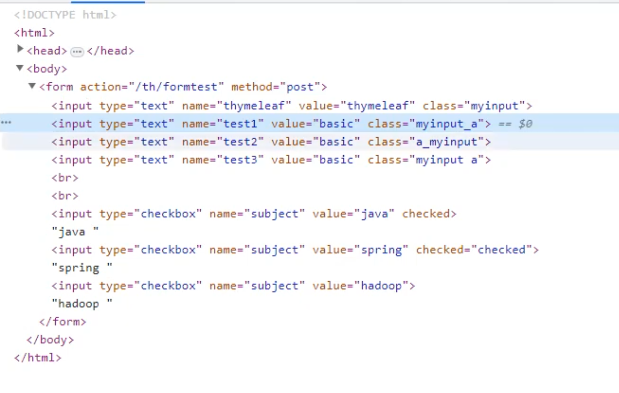
submit버튼 눌러서 @PostMapping으로 넘기면

'타임리프' 카테고리의 다른 글
| (thymeleaf 기본문법) 객체에 담은 값 출력 및 반복하기 (0) | 2024.04.05 |
|---|---|
| (Thymeleaf 기본 문법) 타임리프에서 조건 적용하기 (0) | 2024.04.05 |
| (Thymeleaf 기본 문법) HTML Template 기본값 편집하기 (0) | 2024.04.04 |
| (Thymeleaf 기본 문법) 타임리프-연산자 (0) | 2024.04.04 |
| (Thymeleaf 기본 문법) 타임리프 text 속성 (0) | 2024.04.04 |
'타임리프' Related Articles
more


